Company Settings
Overview
Company settings is where you configure how Workmax works for your organisation — from payroll and payments through to timesheets, scheduling, expenses, time off, HR and care. It replaces the separate settings screens with a single place to manage everything.
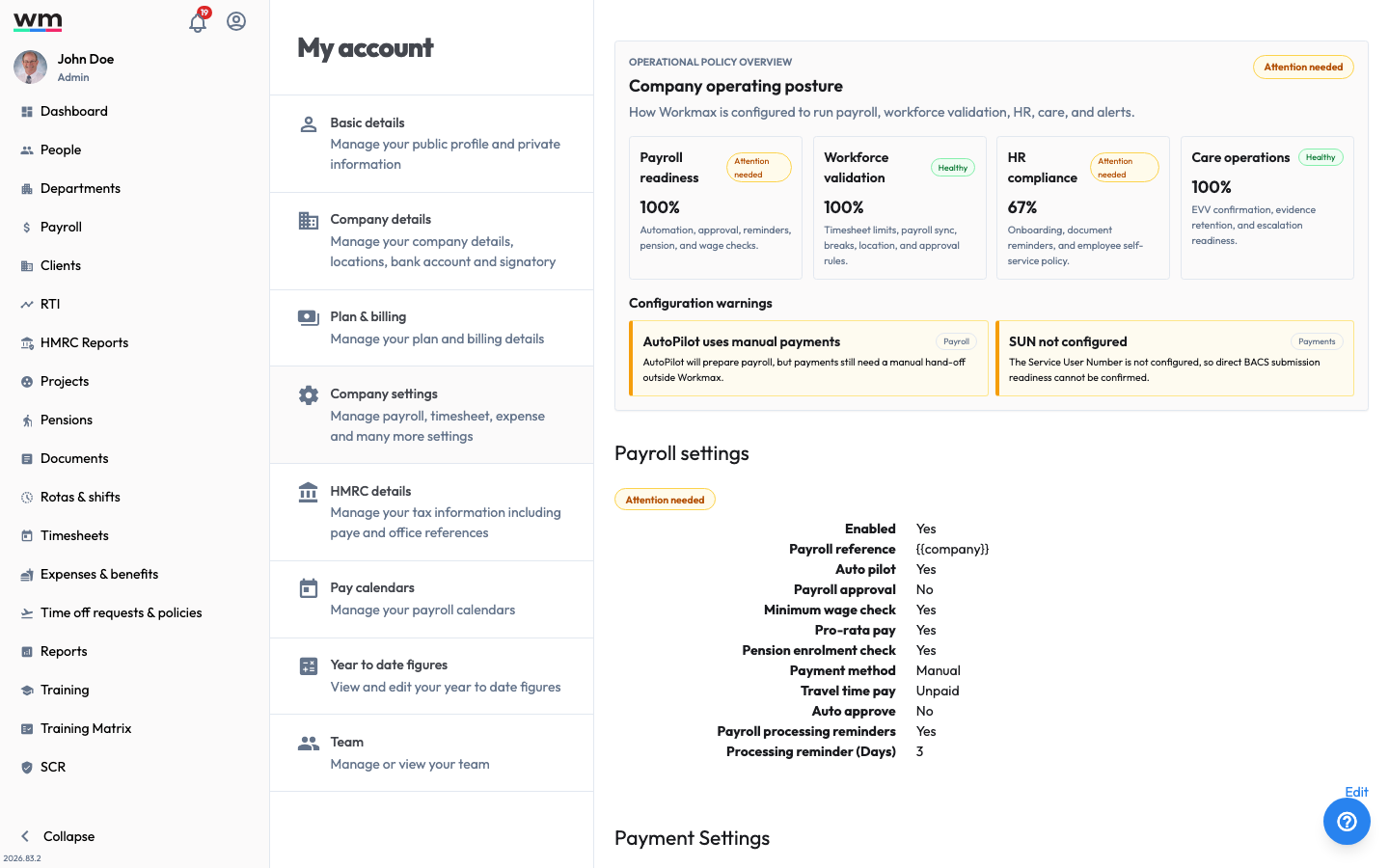 Company settings, a single place to configure how Workmax runs for your organisation.
At the top of the page, an operational policy overview gives you a health check across your key areas (payroll readiness, workforce validation, HR compliance and care operations), highlighting anything that needs attention.
To open it, sign in with an admin account, go to My Account and select Company settings.
Features
- Payroll Settings: Configure how payroll runs, including automation and approvals.
- Payment Settings: Set up your BACS payment details for manual payroll.
- Manage your Wallet: Fund, withdraw and view transactions for automated payments.
- Timesheet Settings: Control timesheet limits, breaks and approvals.
- Shift Scheduling Settings: Configure how shifts and rotas work.
- Expense Settings: Set your expense policy and approval rules.
- Time Off Settings: Configure leave entitlement and approvals.
- HR Settings: Manage onboarding, documents and self-service policy.
- Care Settings: Configure care, electronic visit verification and evidence.
- Care Alert Settings: Set up who is alerted when care issues occur.